VRChat

拍子ライナー BeatLine|音に小物モーションを配置するUnityツール【日本語・English・한국어】

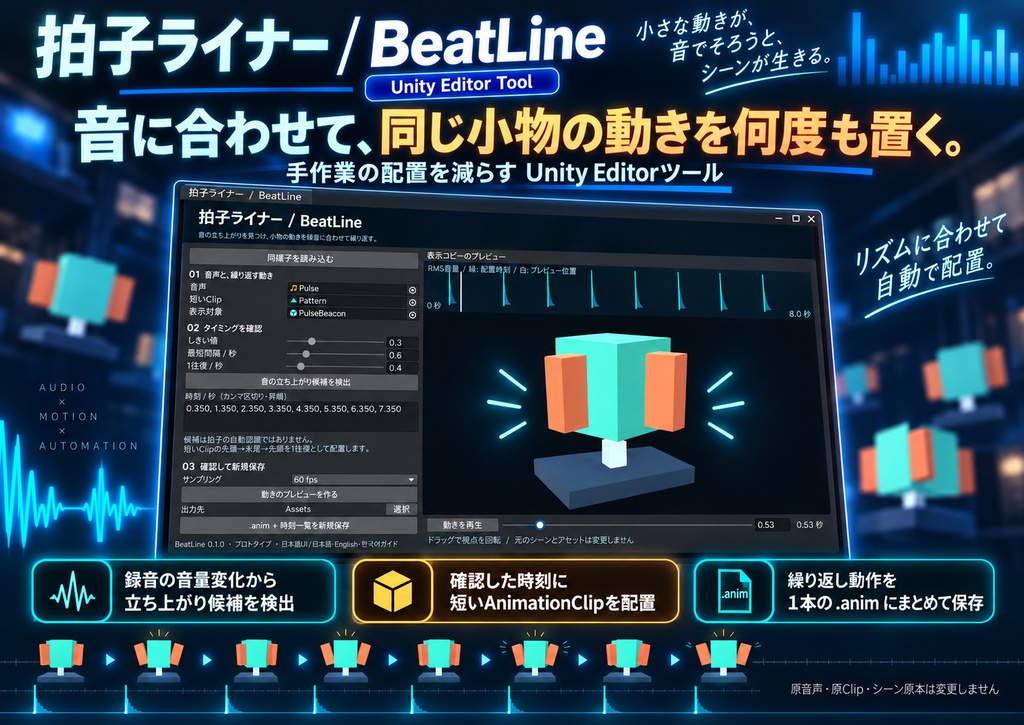
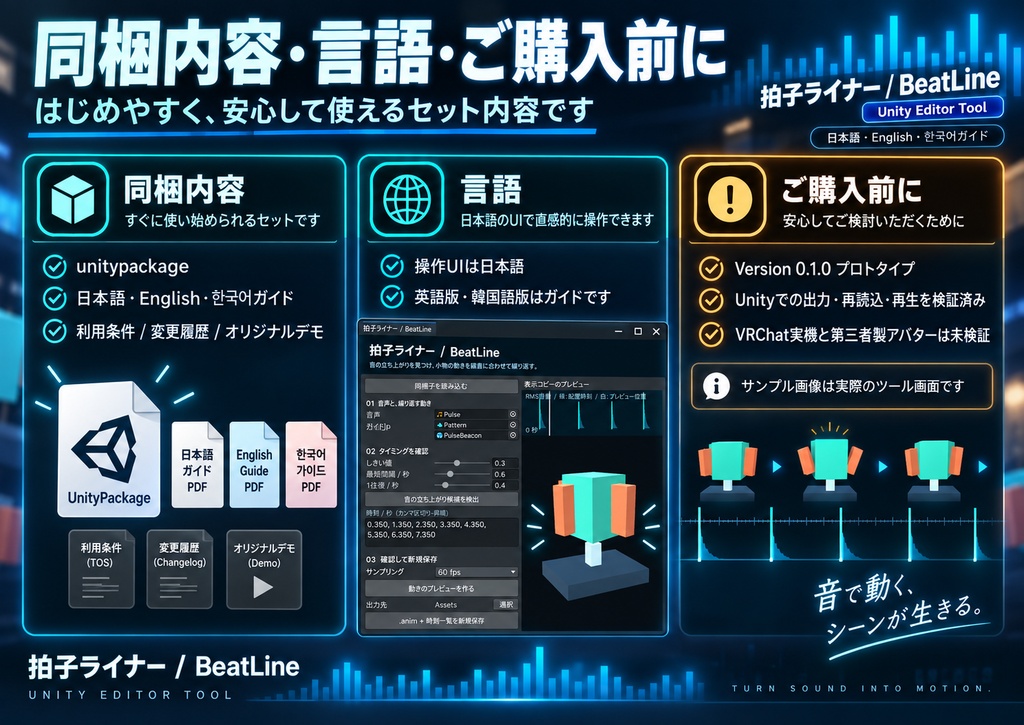
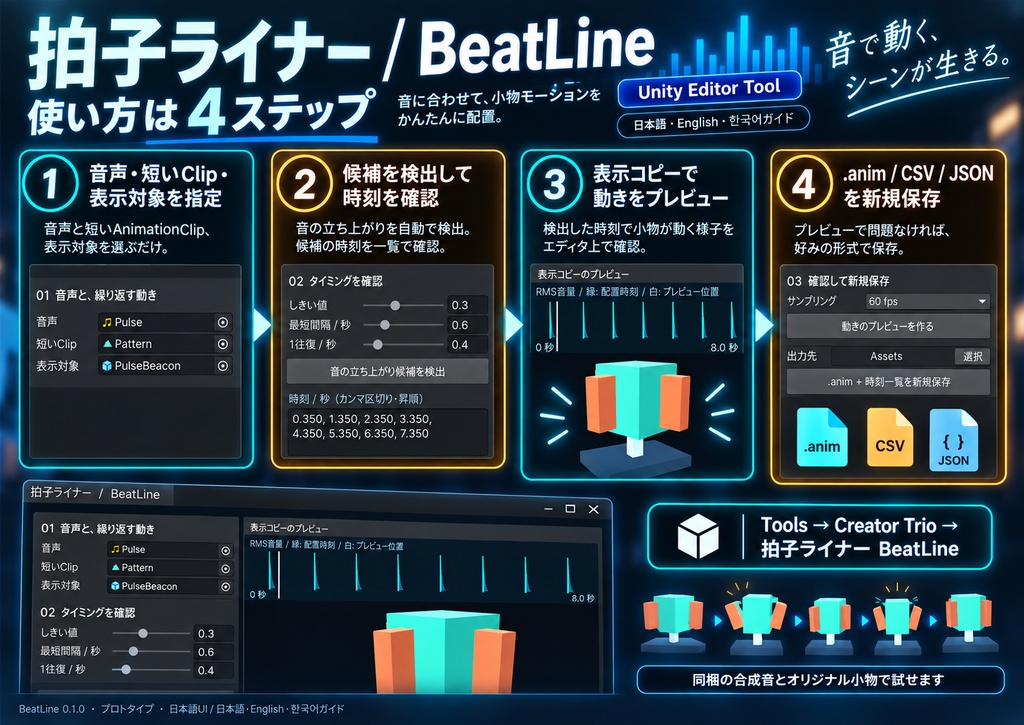
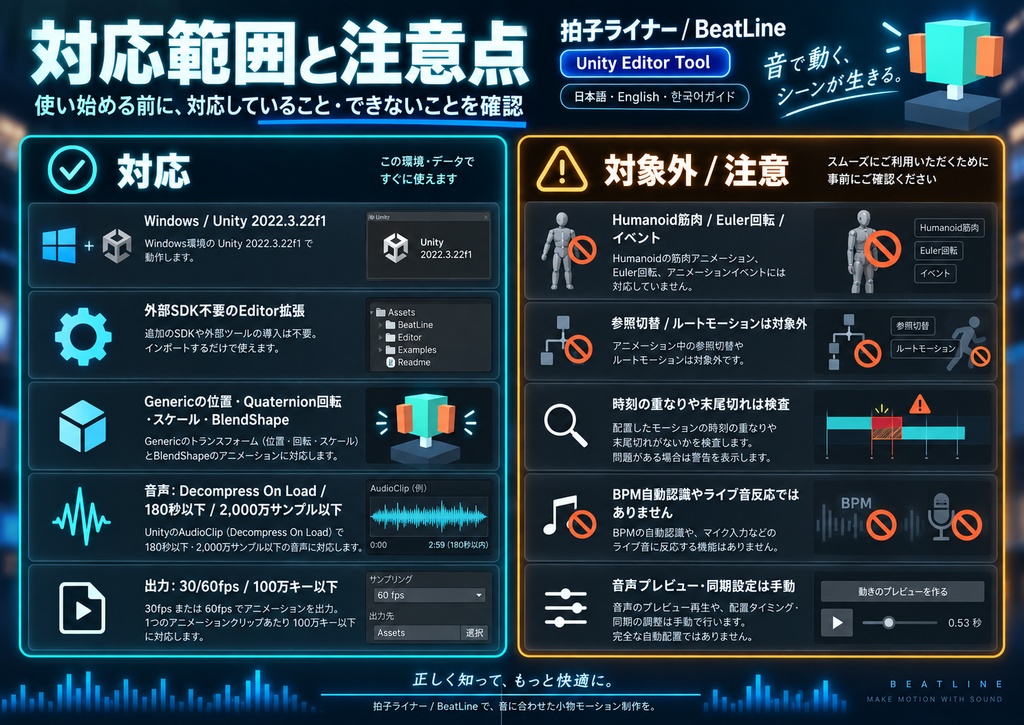
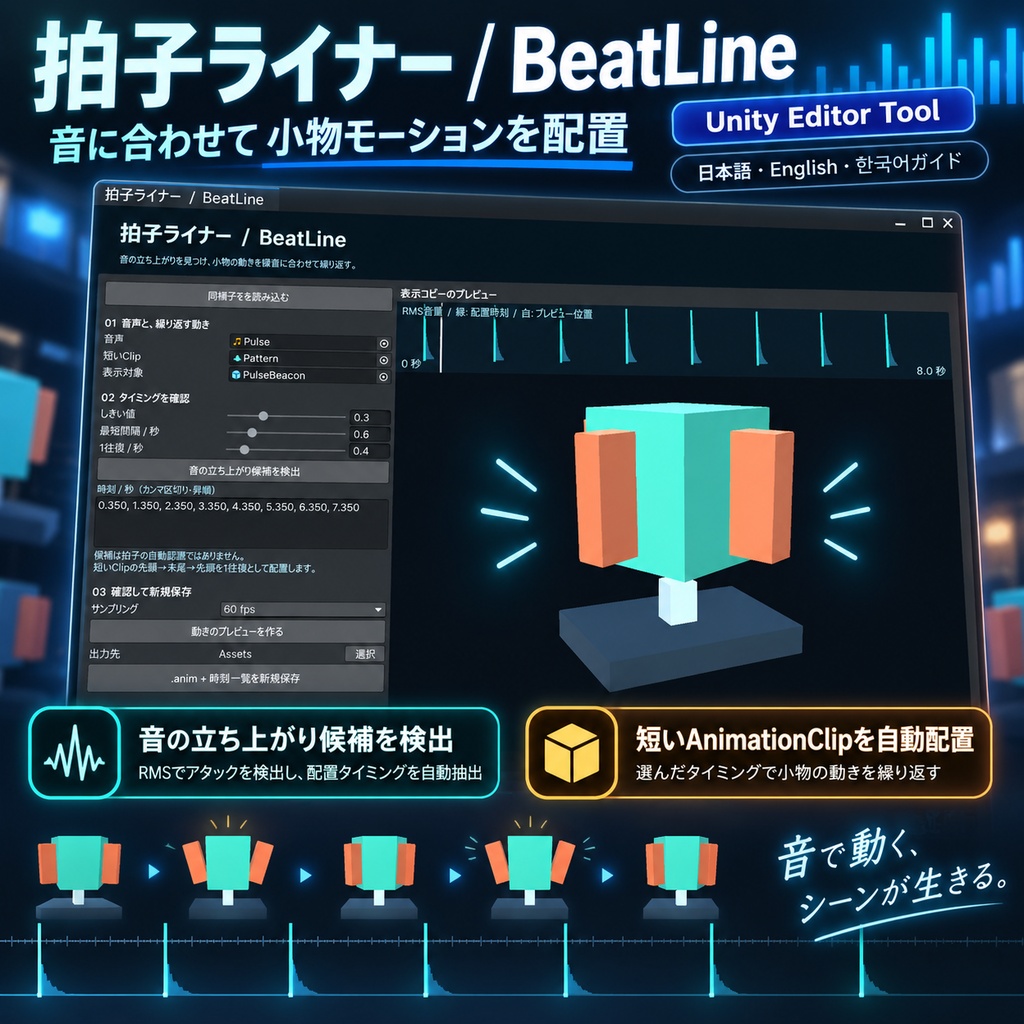
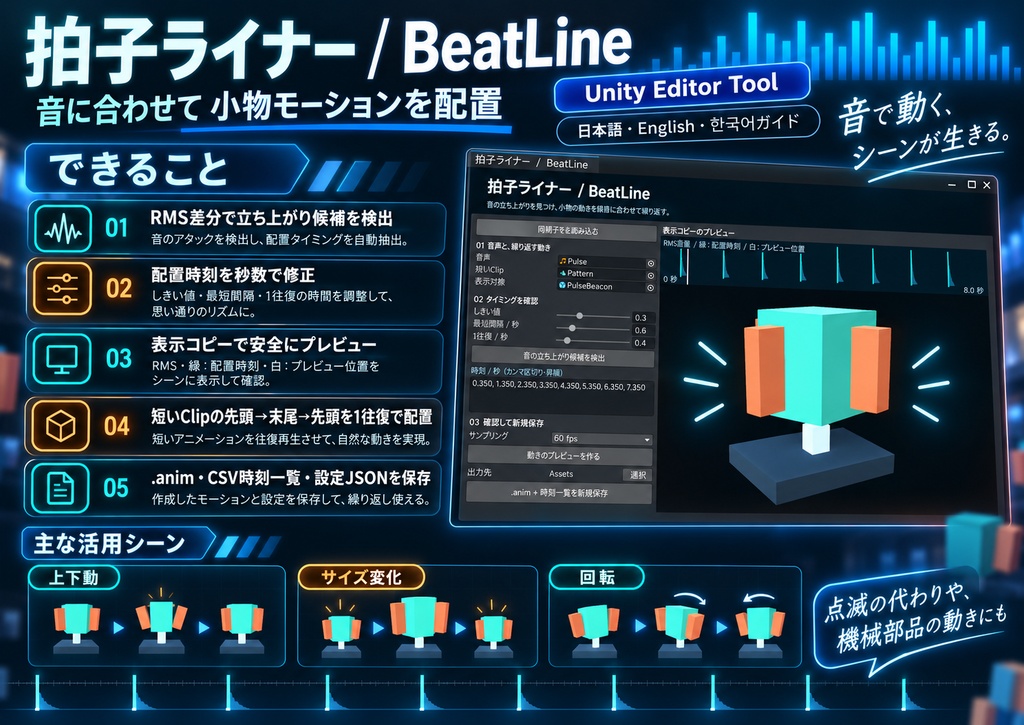
音に合わせて、同じ小物の動きを何度も置く。その手間を減らすUnity Editorツールです。 拍子ライナーは録音の音量変化から立ち上がり候補を出し、確認した時刻に短いAnimationClipを配置します。小物の上下動、点滅の代わりに使うサイズ変化、機械部品の回転などを、1本の.animにまとめられます。 ■ できること ・音の立ち上がり候補をRMS差分で検出し、波形表示で確認 ・配置時刻を秒数で修正し、表示コピーで動きをプレビュー ・.anim、CSV時刻一覧、設定JSONを毎回新しいフォルダへ保存 短いClipの先頭→末尾→先頭を1往復として繰り返します。原音声・原Clip・シーン原本は変更しません。 ■ 使い方 Tools → Creator Trio → 拍子ライナー BeatLineを開き、音声・短いClip・表示対象を指定。候補を検出して時刻を確認し、プレビュー後に保存します。同梱の合成音とオリジナル小物で試せます。 ■ ご購入前に Windows / Unity 2022.3.22f1で確認。外部SDK不要のEditor拡張です。対象カーブはGenericの位置・Quaternion回転・スケールとBlendShape。Humanoid筋肉、Euler回転、イベント、参照切替、ルートモーションは対象外です。 音声はDecompress On Load、180秒以下・2,000万サンプル以下。出力は30/60fps・100万キー以下。時刻の重なりや末尾切れは検査します。 拍子・BPM・楽曲構造の自動認識やライブ音反応ではありません。音声の同時再生、AudioSource、Animator、VRChatメニュー・同期は手動設定です。音声を鳴らすプレビュー機能はありません。 ■ 内容と言語 unitypackage、日英韓ガイド、利用条件、変更履歴、オリジナルデモを同梱。操作UIは日本語です。英語版・韓国語版はガイドであり、UIの言語切替ではありません。 0.1.0のプロトタイプです。Unityでの出力・再読込・再生を検証済み。VRChat実機と第三者製アバターの互換性は未検証です。サンプル画像は実際のツール画面です。ご自身の入力素材の利用・配布条件もご確認ください。 --- English --- Repeat a prop motion at chosen moments in recorded audio, then save one portable .anim. BeatLine detects candidate attacks from changes in RMS energy. Review and edit their timestamps, preview a safe display copy, and export an AnimationClip plus CSV markers and JSON settings. Each stamp plays your short clip forward and then backward to its starting pose. Source audio, clips and scene objects are preserved. Open Tools > Creator Trio > 拍子ライナー BeatLine. Select audio, a short clip and a matching preview object. Detect candidates, review times, build the motion preview and save. Original demo geometry and synthetic audio are included. Requirements: Windows / Unity 2022.3.22f1; Editor extension; no external SDK. Supported curves: Generic Transform position, quaternion rotation, scale and BlendShape. Humanoid muscles, Euler rotation, events, reference/discrete switches and root motion are rejected. Audio must use Decompress On Load and be at most 180 seconds / 20 million interleaved samples. Output: 30 or 60 fps, at most 1 million keys. Overlapping stamps and truncated endings are rejected. This is attack detection, not BPM or musical beat understanding. Live audio reaction, audio audition, AudioSource/controller installation and VRChat synchronization are not included. Start audio and the exported clip together yourself. Includes a unitypackage, Japanese/English/Korean guides, terms, changelog and original samples. The UI is Japanese; English and Korean refer to the guides. Version 0.1.0 prototype. Export, reimport and playback were tested in Unity. VRChat runtime and third-party avatars were not tested. Screenshots show the actual tool. You remain responsible for the rights to your input assets. --- 한국어 --- 녹음된 소리의 특정 시점에 소품 모션을 반복 배치하고 하나의 .anim으로 저장하는 Unity Editor 도구입니다. RMS 에너지 변화로 소리의 시작 후보를 찾고, 시각을 직접 수정한 다음 표시용 복사본에서 동작을 확인합니다. 짧은 클립의 처음→끝→처음을 한 번의 왕복 동작으로 배치합니다. 원본 오디오, 클립, 장면 오브젝트는 변경하지 않습니다. Tools > Creator Trio > 拍子ライナー BeatLine에서 오디오, 짧은 클립, 표시 대상을 지정하세요. 후보 검출→시각 검토→모션 미리보기→저장 순서입니다. .anim, 시각 CSV, 설정 JSON을 새 폴더에 저장하며, 자체 제작 데모와 합성음이 포함됩니다. Windows / Unity 2022.3.22f1에서 확인했습니다. 외부 SDK는 필요 없습니다. Generic Transform 위치·Quaternion 회전·스케일과 BlendShape를 지원합니다. Humanoid 근육, Euler 회전, 이벤트, 참조 전환, 루트 모션은 지원하지 않습니다. 오디오는 Decompress On Load, 180초 이하·2,000만 샘플 이하입니다. 출력은 30/60fps·100만 키 이하이며, 동작 중복과 끝부분 잘림은 거부합니다. BPM·박자 구조 자동 분석이나 실시간 오디오 반응이 아닙니다. 소리 재생 미리보기, AudioSource/Animator 설치, VRChat 메뉴·동기화는 포함하지 않습니다. 오디오와 출력 클립의 동시 시작은 직접 설정하세요. unitypackage, 일본어·영어·한국어 가이드, 이용 조건, 변경 이력, 데모가 포함됩니다. 조작 UI는 일본어이며 영어·한국어 UI 전환 기능은 없습니다. 0.1.0 프로토타입입니다. Unity 출력·재가져오기·재생을 검증했으며, VRChat 실기와 타사 아바타 호환성은 미검증입니다. 이미지는 실제 도구 화면입니다. 입력 소재의 이용·배포 권한도 확인하세요.
拍子ライナー BeatLine|音に小物モーションを配置するUnityツール【日本語・English・한국어】
音に合わせて、同じ小物の動きを何度も置く。その手間を減らすUnity Editorツールです。 拍子ライナーは録音の音量変化から立ち上がり候補を出し、確認した時刻に短いAnimationClipを配置します。小物の上下動、点滅の代わりに使うサイズ変化、機械部品の回転などを、1本の.animにまとめられます。 ■ できること ・音の立ち上がり候補をRMS差分で検出し、波形表示で確認 ・配置時刻を秒数で修正し、表示コピーで動きをプレビュー ・.anim、CSV時刻一覧、設定JSONを毎回新しいフォルダへ保存 短いClipの先頭→末尾→先頭を1往復として繰り返します。原音声・原Clip・シーン原本は変更しません。 ■ 使い方 Tools → Creator Trio → 拍子ライナー BeatLineを開き、音声・短いClip・表示対象を指定。候補を検出して時刻を確認し、プレビュー後に保存します。同梱の合成音とオリジナル小物で試せます。 ■ ご購入前に Windows / Unity 2022.3.22f1で確認。外部SDK不要のEditor拡張です。対象カーブはGenericの位置・Quaternion回転・スケールとBlendShape。Humanoid筋肉、Euler回転、イベント、参照切替、ルートモーションは対象外です。 音声はDecompress On Load、180秒以下・2,000万サンプル以下。出力は30/60fps・100万キー以下。時刻の重なりや末尾切れは検査します。 拍子・BPM・楽曲構造の自動認識やライブ音反応ではありません。音声の同時再生、AudioSource、Animator、VRChatメニュー・同期は手動設定です。音声を鳴らすプレビュー機能はありません。 ■ 内容と言語 unitypackage、日英韓ガイド、利用条件、変更履歴、オリジナルデモを同梱。操作UIは日本語です。英語版・韓国語版はガイドであり、UIの言語切替ではありません。 0.1.0のプロトタイプです。Unityでの出力・再読込・再生を検証済み。VRChat実機と第三者製アバターの互換性は未検証です。サンプル画像は実際のツール画面です。ご自身の入力素材の利用・配布条件もご確認ください。 --- English --- Repeat a prop motion at chosen moments in recorded audio, then save one portable .anim. BeatLine detects candidate attacks from changes in RMS energy. Review and edit their timestamps, preview a safe display copy, and export an AnimationClip plus CSV markers and JSON settings. Each stamp plays your short clip forward and then backward to its starting pose. Source audio, clips and scene objects are preserved. Open Tools > Creator Trio > 拍子ライナー BeatLine. Select audio, a short clip and a matching preview object. Detect candidates, review times, build the motion preview and save. Original demo geometry and synthetic audio are included. Requirements: Windows / Unity 2022.3.22f1; Editor extension; no external SDK. Supported curves: Generic Transform position, quaternion rotation, scale and BlendShape. Humanoid muscles, Euler rotation, events, reference/discrete switches and root motion are rejected. Audio must use Decompress On Load and be at most 180 seconds / 20 million interleaved samples. Output: 30 or 60 fps, at most 1 million keys. Overlapping stamps and truncated endings are rejected. This is attack detection, not BPM or musical beat understanding. Live audio reaction, audio audition, AudioSource/controller installation and VRChat synchronization are not included. Start audio and the exported clip together yourself. Includes a unitypackage, Japanese/English/Korean guides, terms, changelog and original samples. The UI is Japanese; English and Korean refer to the guides. Version 0.1.0 prototype. Export, reimport and playback were tested in Unity. VRChat runtime and third-party avatars were not tested. Screenshots show the actual tool. You remain responsible for the rights to your input assets. --- 한국어 --- 녹음된 소리의 특정 시점에 소품 모션을 반복 배치하고 하나의 .anim으로 저장하는 Unity Editor 도구입니다. RMS 에너지 변화로 소리의 시작 후보를 찾고, 시각을 직접 수정한 다음 표시용 복사본에서 동작을 확인합니다. 짧은 클립의 처음→끝→처음을 한 번의 왕복 동작으로 배치합니다. 원본 오디오, 클립, 장면 오브젝트는 변경하지 않습니다. Tools > Creator Trio > 拍子ライナー BeatLine에서 오디오, 짧은 클립, 표시 대상을 지정하세요. 후보 검출→시각 검토→모션 미리보기→저장 순서입니다. .anim, 시각 CSV, 설정 JSON을 새 폴더에 저장하며, 자체 제작 데모와 합성음이 포함됩니다. Windows / Unity 2022.3.22f1에서 확인했습니다. 외부 SDK는 필요 없습니다. Generic Transform 위치·Quaternion 회전·스케일과 BlendShape를 지원합니다. Humanoid 근육, Euler 회전, 이벤트, 참조 전환, 루트 모션은 지원하지 않습니다. 오디오는 Decompress On Load, 180초 이하·2,000만 샘플 이하입니다. 출력은 30/60fps·100만 키 이하이며, 동작 중복과 끝부분 잘림은 거부합니다. BPM·박자 구조 자동 분석이나 실시간 오디오 반응이 아닙니다. 소리 재생 미리보기, AudioSource/Animator 설치, VRChat 메뉴·동기화는 포함하지 않습니다. 오디오와 출력 클립의 동시 시작은 직접 설정하세요. unitypackage, 일본어·영어·한국어 가이드, 이용 조건, 변경 이력, 데모가 포함됩니다. 조작 UI는 일본어이며 영어·한국어 UI 전환 기능은 없습니다. 0.1.0 프로토타입입니다. Unity 출력·재가져오기·재생을 검증했으며, VRChat 실기와 타사 아바타 호환성은 미검증입니다. 이미지는 실제 도구 화면입니다. 입력 소재의 이용·배포 권한도 확인하세요.